Miniwindows in MUSHclient - Light blending modes
Written by Nick Gammon - July 2008. Updated September 2010.
On this page:
See also:
- Introduction
- Creating miniwindows
- Drawing shapes
- Drawing images
- Drawing text
- Hotspots
- Helpful graphics functions
Light blending modes
See Blending images for a description of how to use the image blending function. On this page are illustrated the "lightening" modes.
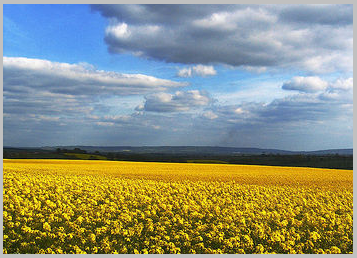
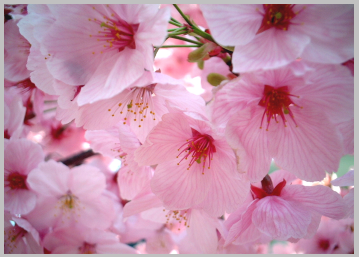
| Base image (in miniwindow) | Blend image (mentioned in WindowBlendImage) |
|---|---|
 |
 |
Lighten mode (11)
Each pixel is compared, the lighter one is taken. Black does not affect the result, white gives a white result.
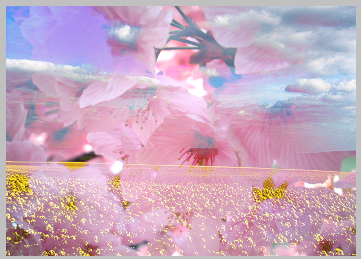
This mode is commutative (base and blend layer can be swapped).
Screen mode (12)
The "opposite" to multiply mode. Both parameters are inverted, multiplied by each other, and the result is inverted again. This returns a brighter result than both input parameters in most cases.
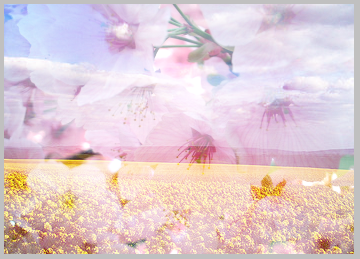
This mode is commutative (base and blend layer can be swapped).
Color Dodge mode (13)
This is like an inverted multiply mode.
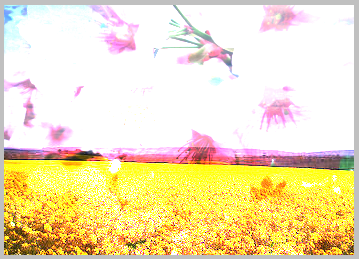
Linear Dodge mode (14)
This is actually the same as Add mode, see below.
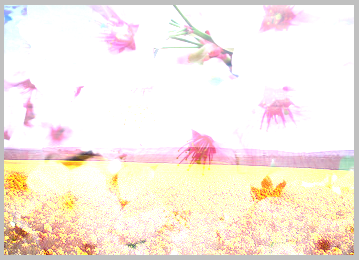
This mode is commutative (base and blend layer can be swapped).
Inverse Color Dodge mode (15)
This is the same as Colour Dodge mode, with the base and blend layers swapped.
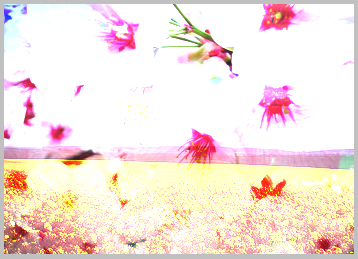
Add mode (16)
The two layers are added together. Some clipping can occur as value exceed 255.

This mode is commutative (base and blend layer can be swapped).
Examples on this page
The examples on this page are taken from Fields of gold... by Spiralz, and Thanks to solea by jam343. These are licensed for royalty-free use under the Attribution 2.5 Generic License. They were obtained from the web site http://www.everystockphoto.com/.
Some ideas and descriptions were adapated from the Pegtop.net Blend Modes article.
Summary of the pages with the various mode groups:
- Normal, average, dissolve
- Darkening modes
- Lightening modes
- Soft/hard light modes
- Difference/logical modes
- Glow modes
- Colour copying
- Colour limiting
- Channel modes
- HSL modes
Other pages about miniwindows
- Introduction
- Creating miniwindows
- Drawing shapes
- Drawing images
- Drawing text
- Hotspots
- Helpful graphics functions
![[Home]](/images/home.gif)